Last updated: July 2, 2026
Quick Answer: Smart garage door openers connect your garage to your home network, letting you open, close, and monitor your door from a smartphone app or voice assistant. For Halton homeowners in 2026, the best options combine reliable Wi-Fi connectivity, UL-listed safety compliance, and no mandatory subscription fees. Most swaps from a traditional opener to a smart one are permit-exempt under Ontario Building Code rules and can be completed in a few hours.
Key Takeaways
- Smart garage door openers add remote access, real-time alerts, and voice assistant control to any garage door setup
- Swapping an opener without changing the door opening size or structure typically does not require a building permit in Halton
- Expect to pay roughly CAD $250 to $600 for a quality unit plus professional installation; DIY kits start around CAD $130
- Battery backup is strongly recommended for Ontario homeowners given the region’s history of ice storms and power interruptions
- Top brands for Halton in 2026 include Chamberlain/LiftMaster (myQ), Genie (Aladdin Connect), and Meross for retrofit kits
- Smart openers work with Amazon Alexa, Google Home, and Apple HomeKit, but compatibility varies by brand and model
- If Wi-Fi goes down, most smart openers still work with the physical wall button and standard remote
- UL 325 compliance is non-negotiable; always confirm a unit carries this listing before purchasing
- Older garage doors (pre-1993) may lack safety reversal features and need a full opener replacement, not just a smart add-on
- Canada’s smart home adoption rate rose from 49% in 2024 to 59% in 2025, making smart garage access one of the fastest-growing home upgrades
What Is a Smart Garage Door Opener and How Does It Work
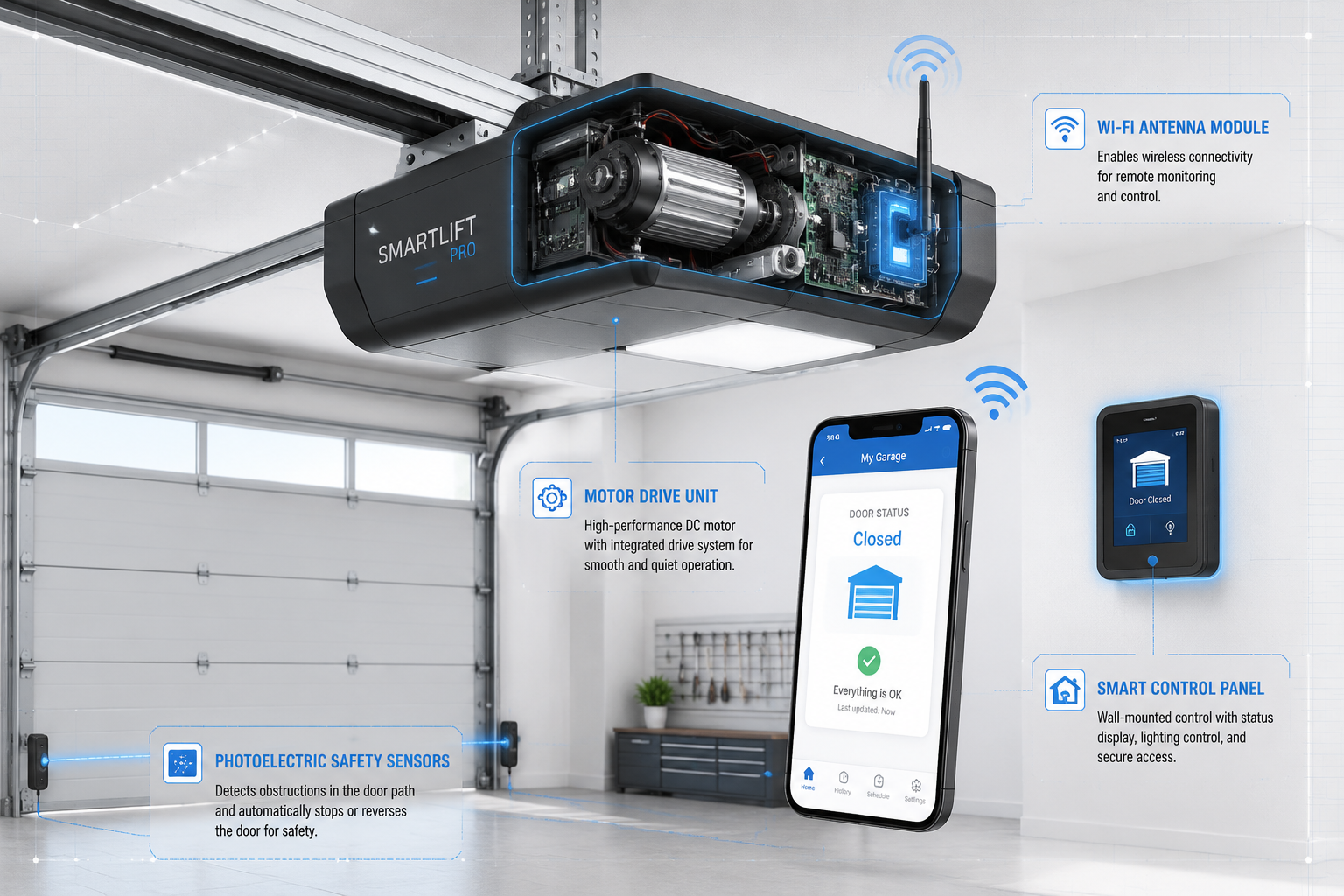
A smart garage door opener is a motorized unit that connects to your home Wi-Fi network, allowing you to control and monitor your garage door through a smartphone app, voice command, or automated schedule. Unlike a traditional opener that only responds to a handheld remote or wall button, a smart opener communicates over the internet so you can check door status and trigger it from anywhere.
How the system works:
- The opener’s motor unit connects to your home router via built-in Wi-Fi or an add-on hub
- A companion app on your phone communicates with the opener through the manufacturer’s cloud server
- Door position sensors (typically magnetic or tilt-based) report open/closed status in real time
- You receive push notifications when the door opens or closes, and you can trigger it manually from the app
- Voice assistant integration lets you say “Hey Google, close the garage” if the opener supports that platform
- Automation rules (such as auto-close at 10 p.m.) run through the app or a connected smart home hub
Modern units also log activity, so you can see a timestamped record of every open and close event. This is particularly useful for households with teenagers, delivery drivers, or service workers who need temporary access.
Smart Garage Door Opener vs. Traditional Garage Door Opener: What’s the Difference
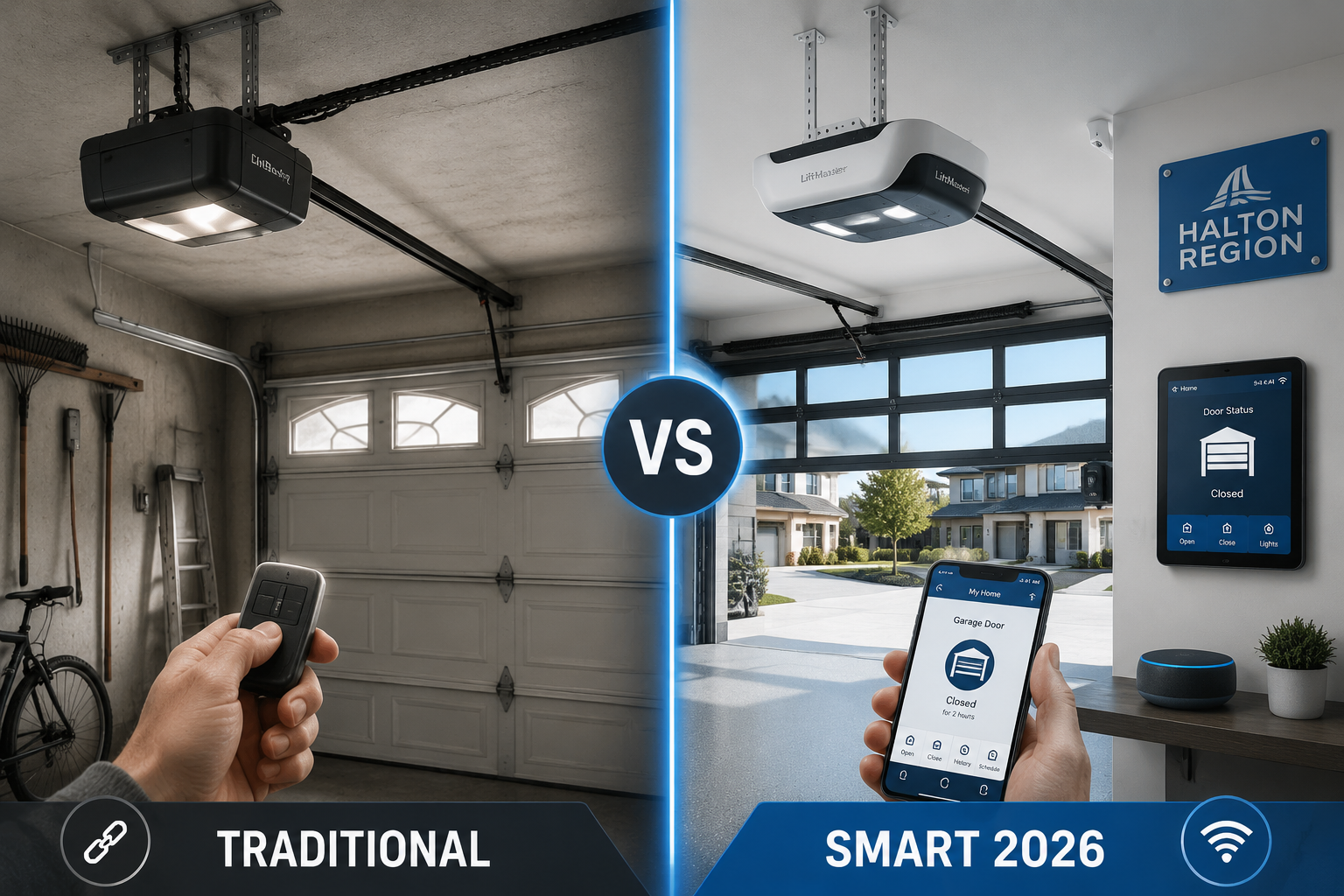
The core difference is connectivity. A traditional opener works only when someone presses a physical remote or wall button within range. A smart opener adds network connectivity, remote access, and event logging on top of the same basic motor-and-rail mechanism.
| Feature | Traditional Opener | Smart Opener |
|---|---|---|
| Control method | Remote, wall button | App, voice, remote, wall button |
| Remote access | No | Yes, from anywhere |
| Door status alerts | No | Yes, push notifications |
| Activity log | No | Yes, timestamped history |
| Guest/temporary access | Not possible | Yes, via app sharing |
| Auto-close scheduling | No | Yes |
| Voice assistant support | No | Yes (varies by brand) |
| Average cost (unit only) | CAD $150–$300 | CAD $250–$600 |
| Wi-Fi dependency | None | Required for remote features |
Choose a smart opener if you regularly forget whether you closed the garage, want to let in a contractor without being home, or are building out a broader smart home setup. Stick with a traditional opener if your budget is tight, your internet connection is unreliable, or you simply have no interest in app-based control.
Best Smart Garage Door Opener Brands Recommended for Halton Homeowners
For Halton homeowners in 2026, three brands consistently stand out for reliability, Canadian availability, and no-subscription value: Chamberlain/LiftMaster, Genie, and Meross.
Chamberlain / LiftMaster (myQ platform)
- The most widely installed smart opener brand in North America
- myQ app offers real-time alerts, activity history, and integration with Amazon Key for in-garage delivery
- Higher-end LiftMaster models include built-in camera (myQ Secure View), battery backup, and jackshaft (wall-mount) options
- Some myQ features now require a paid subscription tier; confirm which features are free before purchasing
- For a detailed look at the camera-equipped model, see this review of the myQ Secure View 3-in-1 Smart Lock
Genie (Aladdin Connect)
- The Aladdin Connect ALKT1-R retrofit kit runs approximately USD $100 (roughly CAD $135) and adds smart control to most existing openers
- No recurring subscription required for core features: Wi-Fi control, multi-user access, and door status alerts
- Good choice for homeowners who want smart features without replacing a functional existing opener
Meross
- Budget-friendly retrofit sensor (under CAD $50) compatible with Apple HomeKit, Google Home, and Amazon Alexa
- Works with most existing openers; does not replace the motor unit
- Best for tech-savvy homeowners comfortable with basic wiring and app setup
Honorable mentions: Overhead Door (Destiny series), Ryobi Ultra-Quiet, and Craftsman Smart Garage Hub for budget retrofits.
Smart Garage Door Opener Cost and Installation Price
The total cost for a smart garage door opener in Halton in 2026 ranges from about CAD $130 for a DIY retrofit kit to CAD $900 or more for a premium unit with professional installation.
Cost breakdown:
- Retrofit/add-on kit (DIY): CAD $130–$200. Adds smart features to an existing compatible opener. No motor replacement needed.
- Mid-range smart opener (unit only): CAD $250–$400. Includes Wi-Fi, app control, and standard safety sensors.
- Premium smart opener (unit only): CAD $400–$600+. Adds built-in camera, battery backup, ultra-quiet belt drive, or jackshaft design.
- Professional installation labour: CAD $150–$350, depending on the complexity of the job and whether old hardware needs removal.
- Total installed cost (mid-range): CAD $400–$750 is a reasonable budget for most Halton homeowners.
If your existing springs or cables are worn, factor in those repairs separately. A broken spring replacement in the Oakville area, for example, adds to the overall project cost. See the current pricing breakdown in this guide to garage door spring replacement costs in Oakville in 2026.
Common cost mistakes:
- Buying a unit that requires a paid monthly subscription (CAD $3–$10/month adds up)
- Not budgeting for a new wall console or keypad if the existing one is incompatible
- Skipping battery backup, then paying for an emergency service call during the next Ontario ice storm
Can You Install a Smart Garage Door Opener Yourself, or Do You Need a Professional
Most homeowners with basic DIY skills can install a retrofit smart kit themselves in under an hour. Replacing a full opener unit is more involved but still within reach for someone comfortable with basic wiring and following manufacturer instructions.
DIY is reasonable when:
- You are adding a retrofit sensor/hub to an existing functional opener
- The existing rail, motor, and springs are in good condition
- You are comfortable working on a step ladder and following wiring diagrams
- The new unit uses the same drive type (chain, belt, or screw) as the old one
Hire a professional when:
- The opener needs a full replacement and the springs or cables are also worn
- You have a high-lift door, a commercial-grade door, or an unusual ceiling configuration
- You want the work guaranteed and want to avoid voiding the product warranty
- You are installing a jackshaft (wall-mount) opener, which requires different hardware placement
From a permit standpoint, swapping an opener without changing the structural opening does not require a building permit in Halton under the current Ontario Building Code. Structural changes, enlarging the opening, or converting the garage space are a different matter and can trigger fines up to $50,000 under the Ontario Building Code Act if done without proper permits.
For professional opener service in the Halton area, garage door opener repair and installation in Oakville is available with same-day response.
Do Smart Garage Door Openers Work with Alexa and Google Home
Most major smart garage door openers sold in 2026 support Amazon Alexa and Google Home, but Apple HomeKit compatibility is less universal and requires specific models or a compatible hub.
Compatibility at a glance:
- Amazon Alexa: Supported by Chamberlain myQ, Genie Aladdin Connect, Meross, and most major brands. Note that myQ’s direct Alexa skill has had integration changes; confirm current status before buying.
- Google Home: Supported by Meross, Genie Aladdin Connect, and select Chamberlain models.
- Apple HomeKit: Supported natively by Meross and a small number of other brands. Some openers require a Homebridge server or a third-party bridge for HomeKit.
- SmartThings / Matter: Growing support in 2026; check the specific model’s compatibility page.
Practical tip: Voice commands for garage doors are typically limited to open, close, and status queries. Most platforms require you to confirm a PIN before opening for security reasons. If voice control is a priority, confirm the exact commands supported before purchasing, as “open garage” may work differently across platforms.
Smart Garage Door Opener Security Concerns and Safety Features
Smart garage door openers introduce two categories of concern: physical safety (the door not crushing people or objects) and digital security (unauthorized access through the app or network).
Physical safety requirements (UL 325):
Every garage door opener sold in Canada must comply with UL 325, the North American safety standard for door operators. Key required features include:
- Auto-reversal when the door contacts an obstruction
- Photoelectric sensors (safety eyes) mounted near floor level that stop and reverse the door if the beam is broken
- Manual release cord (typically red) for use during power outages
- Clear warning labels on the unit and door
After installing any smart opener or add-on kit, test the auto-reversal by placing a 2×4 flat on the floor under the door and closing it. The door must reverse on contact. Also test the photoelectric beam by breaking it with your foot mid-close. If either test fails, stop using the opener and call a technician.
Digital security best practices:
- Use a strong, unique password for your opener’s app account
- Enable two-factor authentication if the app supports it
- Keep the opener’s firmware updated; manufacturers push security patches through app updates
- Avoid sharing access credentials; use the app’s guest access feature instead
- Secure your home Wi-Fi network with WPA3 encryption if your router supports it
Rolling code technology (used by most modern openers) means each remote signal uses a new encrypted code, making signal interception attacks impractical. This protection applies to the physical remote but not to the app account, which is why account security matters.
What Happens to a Smart Garage Door Opener If Wi-Fi Goes Down
If your home Wi-Fi goes down, you lose remote app access and voice assistant control, but the physical wall button and handheld remote continue to work normally. The door itself is not dependent on internet connectivity for local operation.
What still works without Wi-Fi:
- Wall-mounted button inside the garage
- Handheld remote transmitters
- Keypad entry (if installed)
- Manual release cord
What stops working without Wi-Fi:
- Smartphone app control from inside or outside the home
- Push notifications and status alerts
- Voice assistant commands
- Automated schedules and rules
Ontario homeowners should also plan for power outages, which are a separate issue from Wi-Fi loss. During a power outage, neither the motor nor the Wi-Fi router will function. A battery backup unit keeps the opener running for a set number of cycles even when the power is out. This is especially relevant in Halton, where winter ice storms can knock out power for hours. For a full breakdown of why battery backup matters in Ontario, see this guide to battery backup garage door openers and Ontario power outages.
Smart Garage Door Opener Battery Backup Requirements
Battery backup is a separate feature from the main smart functions and is not included on every model. For Ontario homeowners, it is one of the most practical upgrades available.
How battery backup works: A sealed lead-acid or lithium battery pack connects to the opener and automatically takes over when grid power is lost. Most backup systems provide 20 to 50 open/close cycles before the battery depletes, which is enough for a typical 4-to-8 hour outage.
What to look for:
- Battery capacity rated for at least 20 cycles per charge
- Automatic recharge when power is restored
- Low-battery indicator or app notification
- Compatibility with your specific opener model (not all units accept a backup battery)
LiftMaster’s 8500W and 87504-267 models include built-in battery backup. Chamberlain’s B2405 is a mid-range belt-drive unit with backup included. If your preferred opener does not include backup, confirm whether an add-on battery kit is available for that model before purchasing.
Smart Garage Door Opener Compatibility with Older Garage Doors
Most smart openers are compatible with standard residential garage doors built after 1993, but older doors and openers require extra attention before adding smart technology.
Key compatibility factors:
- Safety reversal: Garage doors and openers manufactured before January 1, 1993 are not required to have auto-reversal. If your existing opener predates this, a full replacement (not just a smart add-on) is the right move.
- Drive type: Smart openers come in chain drive, belt drive, screw drive, and jackshaft (wall-mount) configurations. The drive type needs to match your door’s weight, height, and ceiling clearance.
- Ceiling clearance: Standard openers need roughly 10 to 12 inches of headroom above the door. Low-headroom or high-lift doors require specific hardware.
- Door weight and size: Most residential smart openers handle single doors up to 500 lbs and double doors up to 600 lbs. Oversized or custom doors may need a commercial-grade operator.
- Retrofit kits: If your existing opener motor is in good shape but just lacks smart features, a retrofit kit (like the Genie Aladdin Connect or Meross sensor) can add connectivity without a full replacement, provided the existing opener has a compatible terminal strip.
For homes in older Halton neighbourhoods like Glen Abbey or Bronte, where original builders may have installed basic openers 20 or more years ago, a full assessment before purchasing any smart kit is worthwhile. Local service resources include Glen Abbey garage door services and Bronte garage door installation for homes with specific structural considerations.
Who Needs a Smart Garage Door Opener and Is It Worth It
Smart garage door openers deliver the most value for homeowners who frequently leave the house without being sure the door is closed, have multiple family members or service providers needing access, or are already using a smart home platform.
Best candidates:
- Households where the garage is the primary entry point (very common in Halton’s suburban layout)
- Homeowners who travel or work irregular hours
- Families with teenagers who need independent access
- Anyone who has had a break-in or security concern related to the garage
- Homeowners building out an Alexa, Google Home, or HomeKit ecosystem
Less compelling for:
- Homeowners who use their garage strictly for storage and rarely open the door
- Anyone with very unreliable internet service
- Rental properties where tenants may not want landlord-accessible smart controls
Is it worth the cost? For most Halton homeowners who use the garage daily, yes. The convenience of a status check from the office, combined with auto-close scheduling and activity logging, addresses real daily friction. The break-even point versus a traditional opener is typically 2 to 3 years when you factor in the avoided cost of driving back home to check the door or calling a locksmith after a forgotten closure.
Common Problems with Smart Garage Door Openers and How to Fix Them
The most common issues with smart garage door openers fall into three categories: connectivity failures, sensor misalignment, and app or firmware problems.
Connectivity problems:
- Symptom: App shows “offline” or “unable to connect”
- Fix: Restart the opener’s Wi-Fi module (usually a button on the unit or through the app), check that the router is broadcasting on 2.4 GHz (most openers do not support 5 GHz), and confirm the opener is within range of the router. A Wi-Fi extender near the garage often solves weak signal issues.
Safety sensor issues:
- Symptom: Door reverses immediately after starting to close, or won’t close at all
- Fix: Check that the photoelectric sensors (the small units near the floor on each side of the door) are aligned and their indicator lights are solid (not blinking). Clean the lenses with a dry cloth. Realign by loosening the mounting bracket and pointing both sensors directly at each other.
App or firmware problems:
- Symptom: App commands are delayed or not registering
- Fix: Check for app updates and opener firmware updates. Delete and reinstall the app if the issue persists. If the opener has been factory reset, re-pair it with the app from scratch.
Door reverses before fully closing: This is often a limit switch or force setting issue, not a smart-specific problem. See the detailed guide on why your garage door reverses before closing and how to fix it for step-by-step troubleshooting.
For persistent issues that go beyond app settings, garage door opener repair service is available across the Halton region.
How to Troubleshoot Smart Garage Door Opener Connection Issues
Connection issues are the most common complaint with smart openers, and most can be resolved without a service call by following a structured process.
Step-by-step troubleshooting checklist:
- Confirm your Wi-Fi network is 2.4 GHz. Most smart openers only connect to 2.4 GHz networks, not 5 GHz. If your router broadcasts both on the same SSID, temporarily separate them in router settings during setup.
- Check signal strength at the opener location. If the garage is detached or at the far end of the house, the Wi-Fi signal may be too weak. Use a Wi-Fi analyzer app on your phone to check signal at the opener’s location. Aim for -70 dBm or stronger.
- Restart the opener’s smart module. Most units have a reset button or a power cycle procedure. Unplug the unit for 30 seconds, then reconnect.
- Check for router firmware updates. An outdated router can cause intermittent connectivity with IoT devices.
- Verify app permissions. On iOS and Android, ensure the opener app has permission for notifications and background refresh.
- Re-pair the device. If the above steps fail, perform a factory reset on the opener’s smart module and re-add it to the app from scratch.
- Contact manufacturer support. If the unit still won’t connect after re-pairing, the Wi-Fi module may be defective. Most manufacturers offer a 1-year warranty on the smart components.
Frequently Asked Questions
Do I need a permit to install a smart garage door opener in Halton? No, in most cases. Swapping an opener without altering the door opening size or garage structure is typically permit-exempt under Ontario Building Code rules. Structural changes or enlarging the opening require a permit and can result in fines up to $50,000 if done without one.
Will a smart garage door opener work during a power outage? Only if it has a battery backup system. Without battery backup, the motor will not run during an outage. With battery backup, most units can complete 20 to 50 open/close cycles before the battery depletes.
Can I add smart features to my existing opener without replacing it? Yes, if your existing opener is compatible. Retrofit kits like the Genie Aladdin Connect or Meross sensor attach to your current opener and add Wi-Fi connectivity, app control, and status alerts without replacing the motor unit.
What is the best smart garage door opener for Halton homeowners on a budget? The Genie Aladdin Connect ALKT1-R retrofit kit (approximately CAD $135) offers Wi-Fi control, multi-user access, and real-time alerts with no subscription fee, making it the strongest value option for homeowners with a functional existing opener.
How long do smart garage door openers last? The motor unit typically lasts 10 to 15 years with regular maintenance. The smart/Wi-Fi components may need updating sooner as app platforms evolve, which is one reason to choose brands with a strong track record of software support.
Is myQ free to use? Core myQ features (open/close, status check) are available without a subscription. Some advanced features, including in-garage delivery and certain integrations, require a paid plan. Confirm the current fee structure with the retailer before purchasing.
Can two people control the same smart opener? Yes. Most smart opener apps allow multiple users to be added to a single account, each with their own login. Some apps also support temporary or time-limited guest access.
What is UL 325 and why does it matter? UL 325 is the North American safety standard for automatic door operators. It requires auto-reversal, photoelectric safety sensors, a manual release, and proper labeling. Always confirm a unit is UL-listed before purchasing, especially when adding smart Wi-Fi modules to an existing opener.
Do smart garage door openers work with Apple HomeKit? Not universally. Meross and a few other brands support native HomeKit. Chamberlain myQ dropped direct HomeKit support in previous years; check the current status before buying if HomeKit is a requirement. A Homebridge server can bridge non-native devices.
How do I know if my old garage door is compatible with a new smart opener? Check the door’s manufacture date and the existing opener’s safety features. Doors and openers made before 1993 may lack required auto-reversal and should be fully replaced rather than retrofitted. Also confirm ceiling clearance, door weight, and drive type compatibility with the new unit’s specifications.
What happens if the smart opener’s cloud service shuts down? This is a real risk with smaller brands. If the manufacturer discontinues the cloud service, app-based features stop working, though the physical remote and wall button continue to function. Choose established brands with a long market history to reduce this risk.
Can I use a smart garage door opener with a wooden or custom garage door? Yes, as long as the door is properly balanced and within the opener’s weight rating. Custom or oversized doors may require a higher-horsepower unit. For custom door installations in Oakville, see custom garage doors in Oakville for guidance on matching the opener to the door weight.
Conclusion
Smart garage door openers in 2026 are no longer a novelty for Halton homeowners. They are a practical, accessible upgrade that addresses real daily needs: knowing the door is closed, letting in a contractor without being home, and adding a layer of activity logging to a frequently used entry point.
Actionable next steps for Halton homeowners:
- Assess your existing opener. If it predates 1993 or lacks auto-reversal, plan for a full replacement. If it is functional and compatible, a retrofit kit may be all you need.
- Set a realistic budget. CAD $400 to $750 installed covers a solid mid-range smart opener with professional installation. Add CAD $50 to $150 for battery backup if your model does not include it.
- Confirm Wi-Fi coverage in your garage. Test signal strength before purchasing. A Wi-Fi extender is a cheap fix if coverage is weak.
- Choose a no-subscription brand. Genie Aladdin Connect and Meross offer strong core features without monthly fees. If you choose myQ, clarify which features require a paid plan.
- Test safety features after installation. Run the 2×4 reversal test and the photoelectric sensor test before relying on the new opener.
- Consider battery backup. Given Ontario’s winter power interruptions, this is one of the most practical additions available.
For professional assessment, installation, or repair anywhere in the Halton region, Oakview Garage Doors provides same-day service across Oakville, Burlington, Milton, and surrounding communities.