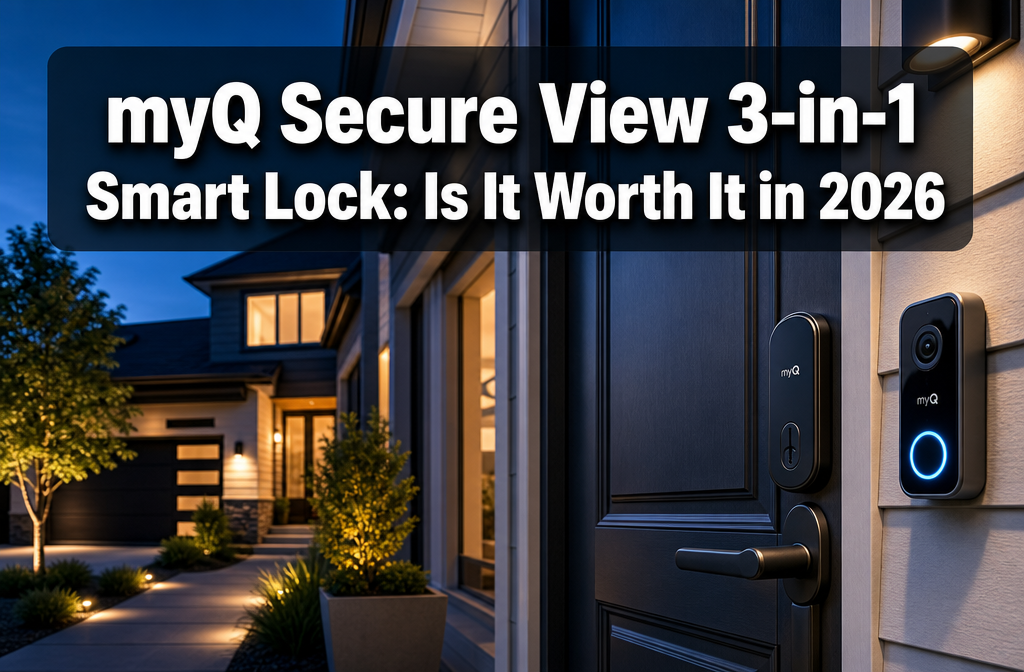
The myQ Secure View 3-in-1 Smart Lock is a strong buy for homeowners who already use the myQ garage ecosystem and want a single device that handles a smart lock, 2K HDR video doorbell, and biometric access. At $279.99 USD, it costs more than most standalone smart locks, but the hardware combination is genuinely useful rather than gimmicky. It’s not the right fit for renters, budget shoppers, or anyone outside the myQ ecosystem who prefers a different smart home platform.
Key Takeaways
- The myQ Secure View 3-in-1 Smart Lock launched January 13, 2026 and won a CES 2026 TWICE Pick Award for influential consumer tech.
- It combines three devices in one: a smart deadbolt, a 2K HDR video doorbell camera, and a fingerprint biometric reader.
- Retail price is $279.99 USD at launch, positioning it as a premium but not ultra-luxury option.
- The lock integrates directly with the myQ ecosystem, which already serves more than 14 million users through Chamberlain’s garage door products.
- AI-powered detection helps distinguish people, packages, and vehicles at the door.
- Setup and firmware are actively supported by Chamberlain Group as of May 2026.
- Best for: existing myQ users, homeowners wanting consolidated front-door tech, and households that use biometric access regularly.
- Not ideal for: renters, Apple HomeKit-only households, or buyers on a tight budget.
- Competitor alternatives include the Arlo Video Doorbell Lock and the Eufy S330 Video Smart Lock.
- Professional installation is not required, but a compatible door prep and Wi-Fi signal at the door are essential.
What Exactly Is the myQ Secure View 3-in-1 Smart Lock?
The myQ Secure View 3-in-1 Smart Lock is a single front-door device that replaces three separate products: a deadbolt, a video doorbell, and a keypad or biometric reader. Chamberlain Group, the company behind the myQ garage door platform, formally launched it on January 13, 2026, after unveiling it at CES 2026 in early January.
The three functions it covers:
- Smart deadbolt – motorized lock with auto-lock, remote locking via the myQ app, and access scheduling.
- 2K HDR video doorbell – live view, motion alerts, two-way audio, and AI-powered detection for people, packages, and vehicles.
- Biometric access – fingerprint reader that allows keyless entry without a phone or code.
Chamberlain described the product as their “boldest expansion” from garage access into whole-home intelligent access. The myQ platform already manages garage door openers for millions of households, so the Secure View lock is designed to extend that same app-based control to the front door.
How Does the Hardware and Camera Quality Hold Up?
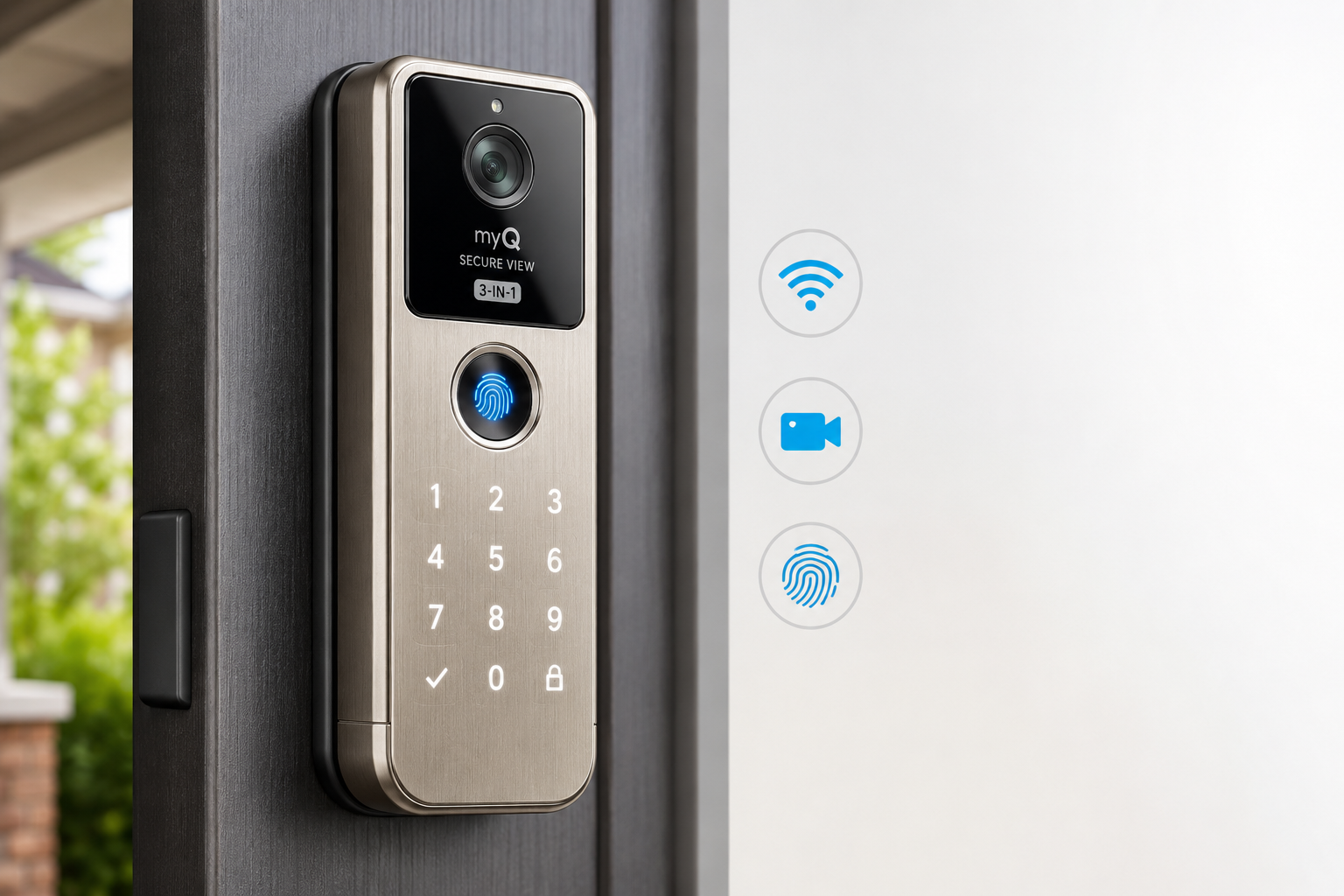
The 2K HDR camera is the standout hardware feature, and it genuinely earns that label. At 2K resolution with HDR processing, it captures enough detail to read package labels and identify faces in mixed lighting conditions, including the harsh backlight situations common on sunny porches.
Hardware highlights:
- Resolution: 2K HDR (roughly 2560×1440, depending on firmware crop)
- AI detection: Separates people, vehicles, and packages rather than triggering on every shadow or passing car
- Biometric sensor: Fingerprint reader supports multiple stored prints, useful for households with several family members
- Finish options: Available in finishes designed to match common door hardware (check current availability with retailers)
- Connectivity: Wi-Fi direct connection to the myQ app; no separate hub required
One practical note: the camera and lock share a single device, so if the lock’s battery runs low, both functions are affected. Keep an eye on battery notifications in the myQ app.
“The hardware combination is genuinely useful rather than gimmicky, but only if your door and Wi-Fi setup can support it.”
Is the myQ Secure View 3-in-1 Smart Lock Worth It in 2026 for Existing myQ Users?
For existing myQ users, the answer is yes, with some conditions. The Secure View lock connects directly to the same myQ app used for garage door control, so managing the front door and garage from one interface is a real convenience gain.
Why it makes sense for myQ users:
- One app controls garage access, front-door lock, and video doorbell
- Shared activity logs mean you can see who arrived, when the garage opened, and when the front door was unlocked in a single timeline
- myQ’s ecosystem has over 14 million active users, suggesting stable long-term software support
- The AI detection works in coordination with myQ’s broader access awareness
Conditions to check first:
- Your front door must have a standard deadbolt prep (most US and Canadian doors qualify)
- Wi-Fi signal must reach the front door reliably (a Wi-Fi extender may be needed for larger homes)
- The myQ app requires a compatible smartphone; older devices may have limitations
If you’re already using a myQ garage opener and want to extend smart access to your front door, the Secure View lock is the most logical addition in 2026. Pairing it with professional garage door opener repair or setup ensures your full entry system works together cleanly.
What Does the $279.99 Price Tag Actually Get You?
At $279.99 USD, the myQ Secure View 3-in-1 Smart Lock sits in the upper-middle tier of the smart lock market. The price is easier to justify when compared against buying three separate devices.
Cost comparison (approximate 2026 retail prices):
| Component | Bought Separately | myQ Secure View Bundle |
|---|---|---|
| Smart deadbolt (mid-range) | ~$120–$150 | Included |
| Video doorbell (2K) | ~$100–$150 | Included |
| Biometric keypad | ~$60–$100 | Included |
| Total estimate | ~$280–$400 | $279.99 |
Buying the three functions separately would likely cost the same or more, and you’d deal with three different apps and installation processes. The bundle pricing is fair.
What’s NOT included:
- Cloud video storage subscription (check myQ’s current subscription tiers for recording history)
- Professional installation (DIY-friendly, but budget time for setup)
- A Wi-Fi extender if your signal doesn’t reach the door
Choose the myQ Secure View if: You want one device, one app, and are replacing an aging doorbell and deadbolt at the same time.
Skip it if: You only need a lock upgrade and already have a working video doorbell you’re happy with.
How Does It Compare to Competing Smart Lock-Camera Combos?
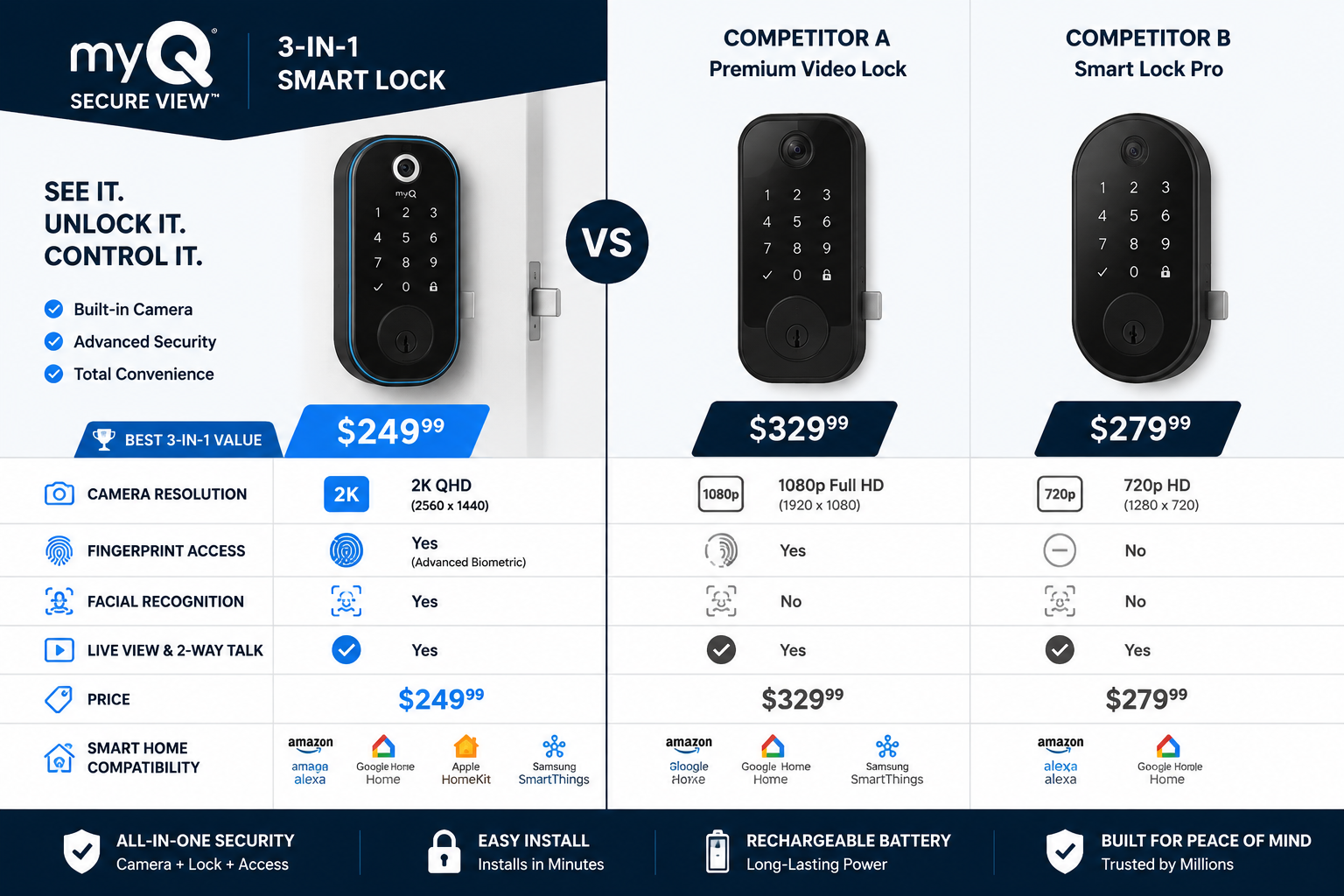
The myQ Secure View 3-in-1 Smart Lock: Is It Worth It in 2026 compared to rivals? The honest answer is that it leads on ecosystem integration but faces real competition on camera features and platform flexibility.
Main competitors in 2026:
Eufy S330 Video Smart Lock
- Also combines lock and camera
- Supports local storage (no subscription needed for basic recording)
- Works with Apple HomeKit, Google Home, and Amazon Alexa
- Slightly lower price point in some markets
- Fingerprint reader included
Arlo Video Doorbell Lock
- Strong camera quality
- Arlo subscription required for full features
- No biometric access
- Better for Arlo ecosystem users
Lockly Visage
- Facial recognition instead of fingerprint
- Higher price
- Smaller user base and ecosystem
Where myQ Secure View wins:
- myQ ecosystem depth (garage + front door integration)
- CES 2026 recognition signals industry credibility
- Active Chamberlain support infrastructure
Where competitors have an edge:
- Eufy offers local storage, reducing subscription dependency
- Eufy and Lockly support more third-party smart home platforms
- Apple HomeKit users may find myQ’s compatibility limited
If smart home platform flexibility matters more than garage integration, the Eufy S330 is worth a close look. If the myQ garage ecosystem is already central to your home, the Secure View lock is the stronger fit.
What Are the Real-World Installation and Setup Considerations?
Setup is DIY-friendly, but a few factors can complicate the process. Chamberlain’s support documentation, updated in May 2026, covers setup, management, and troubleshooting in detail.
Step-by-step installation overview:
- Check door compatibility – Standard US/Canada deadbolt prep (2-1/8″ bore hole) fits most residential doors. Measure before ordering.
- Assess Wi-Fi signal – Test signal strength at your front door using your phone. Weak signal causes connectivity issues and delayed alerts.
- Remove existing hardware – Uninstall the old deadbolt and doorbell (if present).
- Mount the exterior assembly – The lock, camera, and fingerprint reader are integrated into one exterior unit.
- Connect interior components – Install the interior deadbolt motor and battery pack.
- Download and configure the myQ app – Create or log into your myQ account, add the device, and follow in-app pairing steps.
- Register fingerprints – Add prints for each household member through the app.
- Test all three functions – Lock/unlock remotely, check live camera feed, and confirm fingerprint access before relying on it.
Common installation mistakes:
- Skipping the Wi-Fi signal check (the most frequent cause of setup frustration)
- Not aligning the deadbolt throw correctly, which causes the motor to strain
- Forgetting to set up access codes as a backup before relying solely on biometrics
For homeowners who also need keypad and remote programming for their garage system, coordinating both setups at the same time saves a service call.
Does the myQ Secure View 3-in-1 Smart Lock Work Well for Canadian Homeowners?
Canadian homeowners can use the myQ Secure View 3-in-1 Smart Lock, but availability and pricing details deserve attention. The product launched primarily in the US market in January 2026, with Canadian retail availability following through authorized dealers and major electronics retailers.
Canadian-specific considerations:
- Door compatibility: Canadian residential doors typically use the same standard deadbolt prep as US doors, so hardware fit is generally not an issue.
- Pricing: Expect CAD pricing to reflect the exchange rate plus import costs; budget roughly $380–$420 CAD based on typical cross-border pricing patterns (verify current retail prices before purchasing).
- Cold weather performance: Fingerprint readers and motorized locks can be affected by extreme cold. Chamberlain has not published specific operating temperature limits publicly as of May 2026, so check the product spec sheet for your climate zone.
- Wi-Fi standards: The lock uses standard 2.4GHz Wi-Fi, which is compatible with all Canadian ISP-provided routers.
For homeowners in the Greater Toronto Area and surrounding communities, local garage door specialists can help assess whether your entry system is ready for a smart lock upgrade. Teams serving areas like Burlington and Oakville are familiar with the door hardware standards common in Ontario homes.
What Are the Subscription and Privacy Considerations?
Smart devices with cameras always raise fair questions about data storage and ongoing costs. The myQ Secure View 3-in-1 Smart Lock stores video in the cloud through myQ’s platform, and full recording history requires a subscription.
Subscription structure (as of 2026):
Chamberlain offers tiered myQ subscription plans. Basic live view and remote lock control are included with the device. Extended video history, AI-powered alerts, and advanced features require a paid tier. Check myQ’s current pricing directly, as subscription costs and tiers have evolved since the product launch.
Privacy considerations:
- Video data is processed through Chamberlain’s cloud servers
- AI detection (person, vehicle, package) involves server-side processing
- Biometric fingerprint data is stored locally on the device, not in the cloud (Chamberlain’s stated approach as of launch)
- The myQ app requires location permissions for some features; review app permissions during setup
Who should be cautious:
- Households with strong data privacy preferences may prefer a local-storage option like the Eufy S330
- Anyone uncomfortable with cloud-based video storage should review myQ’s privacy policy before purchasing
What Do Early Users and Reviewers Say About It?
The myQ Secure View 3-in-1 Smart Lock received a 2026 CES TWICE Pick Award, which recognizes the most influential consumer tech products at the show. PCMag’s April 2026 review described it as a “sleek-looking smart lock that doubles as a video doorbell,” noting the clean industrial design and reliable app performance.
Positive themes from early coverage:
- Clean, unified design that doesn’t look bulky on a door
- Reliable fingerprint recognition speed
- myQ app integration is smooth for existing ecosystem users
- AI detection reduces false alerts compared to basic motion sensors
Criticism and concerns raised:
- Subscription required for full video history access
- Limited third-party smart home platform support compared to competitors
- Cold-weather fingerprint performance not yet well-documented
- Some users report a learning curve with the myQ app if they’re new to the ecosystem
The overall early reception is positive, particularly among tech reviewers and myQ ecosystem users. Independent long-term reliability data will take another 6–12 months to accumulate.
Conclusion: Should You Buy the myQ Secure View 3-in-1 Smart Lock in 2026?
The myQ Secure View 3-in-1 Smart Lock: Is It Worth It in 2026 comes down to one clear decision rule: buy it if you’re already in the myQ ecosystem and need to upgrade your front door hardware; skip it if you need platform flexibility or local video storage.
At $279.99 USD, the price is fair when you account for the three devices it replaces. The 2K HDR camera, biometric reader, and smart deadbolt in a single unit is a genuinely practical combination, not a marketing exercise. The CES 2026 recognition and active Chamberlain support infrastructure add confidence for long-term ownership.
Actionable next steps:
- Check your door prep — Measure your bore hole before ordering. Most residential doors in the US and Canada are compatible.
- Test your Wi-Fi signal at the door — Use your phone to check signal strength. If it’s weak, order a Wi-Fi extender at the same time.
- Review myQ subscription tiers — Decide whether you need extended video history before committing to the device.
- Compare with the Eufy S330 — If local storage or Apple HomeKit matter to you, spend 20 minutes comparing specs before deciding.
- Coordinate your full entry system — If your garage door opener, springs, or hardware also need attention, address those at the same time. A garage door installation or repair from a qualified local technician ensures your whole entry system is reliable, not just the smart lock.
For homeowners who want a connected, consolidated front-door system and are already invested in the myQ platform, the Secure View 3-in-1 is the most logical upgrade available in 2026.
Frequently Asked Questions
Q: Does the myQ Secure View 3-in-1 Smart Lock work without a subscription? A: Basic functions — remote locking, live camera view, and fingerprint access — work without a paid subscription. Extended video history and advanced AI alert features require a myQ subscription plan.
Q: Is the myQ Secure View compatible with Apple HomeKit? A: As of the January 2026 launch, myQ’s HomeKit compatibility is limited. The platform works with Amazon Alexa and Google Assistant, but HomeKit integration has historically been restricted in the myQ ecosystem. Verify current compatibility on Chamberlain’s website before purchasing.
Q: How long does the battery last? A: Chamberlain has not published a specific battery life figure in public documentation as of May 2026. Battery life will vary based on usage frequency, camera activity, and temperature. The myQ app sends low-battery alerts.
Q: Can multiple family members register fingerprints? A: Yes. The device supports multiple stored fingerprints, and each user can be managed individually through the myQ app, including setting access schedules per user.
Q: Is professional installation required? A: No. The myQ Secure View 3-in-1 is designed for DIY installation on standard residential doors. Most installations take 30–60 minutes. If your door has non-standard hardware or you’re uncomfortable with the process, a local handyman or door technician can assist.
Q: What happens if the Wi-Fi goes down? A: The fingerprint reader and physical key entry (if a key cylinder is included) continue to work offline. Remote app control and camera functions require an active internet connection.
Q: Does it work in cold Canadian winters? A: The device uses standard electronics that can be affected by extreme cold. Chamberlain has not published a specific minimum operating temperature. For very cold climates, monitor fingerprint reader performance during the first winter season.
Q: Where can I buy the myQ Secure View 3-in-1 Smart Lock in Canada? A: As of 2026, it’s available through major electronics retailers and online marketplaces. Confirm Canadian availability and current CAD pricing directly with retailers, as distribution can vary by region.
Q: How does the AI detection work? A: The camera uses server-side AI processing to classify motion events as people, vehicles, or packages. This reduces false alerts from wind, shadows, or passing cars, and sends more specific notifications through the myQ app.
Q: Is the myQ Secure View 3-in-1 Smart Lock a good gift or home upgrade for a new homeowner? A: It’s a strong choice for new homeowners who are setting up a smart home from scratch and want to consolidate front-door hardware. Pair it with a myQ-compatible garage opener for the full ecosystem benefit.